A persistent hum from your studio monitors can be a frustrating distraction, sabotaging your mixing accuracy and overall enjoyment of your audio setup. For audio technicians and home studio enthusiasts alike, a clean, noise-free monitoring environment is paramount for critical listening and producing professional-quality sound. This comprehensive guide will walk you through safe, do-it-yourself steps to identify and eliminate that pesky hum, helping you restore clarity to your sound system without needing professional help.
Understanding the Hum: What Causes Studio Monitor Noise?
Before you can fix the hum, it’s crucial to understand its origins. Studio monitor hum primarily stems from electrical interference or grounding issues within your audio chain. Identifying the specific type of noise—be it a low-frequency hum, a high-pitched hiss, or an electrical buzz—can offer vital clues to the underlying problem.
Ground Loops: The Silent Saboteur
|
Our Picks for the Best Studio Monitor in 2026
As an Amazon Associate I earn from qualifying purchases.
|
||
| Num | Product | Action |
|---|---|---|
| 1 | PreSonus Eris E4.5-2-Way 4.5" Near Field Studio Monitor (Pair) |

|
| 2 | Edifier R1280T Powered Bookshelf Speakers - 2.0 Active Near Field Studio Monitor Speaker - Wooden Enclosure - 42 Watts RMS Power |
|
| 3 | PreSonus Eris 3.5 Studio Monitors, Pair — Powered, Active Monitor Speakers for Near Field Music Production, Desktop Computer, Hi-Fi Audio |
|
| 4 | PreSonus Eris 3.5 Studio Monitors (White), Pair — 3.5" Inch Powered Bookshelf Speakers, Stereo, Desktop Computer, Near Field Music Production, Audio Mixing Recording |
|
| 5 | Yamaha HS3 Powered Studio Monitor in Black, Pair (HS3 B) |
|
| 6 | (2) JBL 305P MkII 5" 2-Way Active Powered Studio Reference Monitors Speakers |
|
| 7 | Yamaha HS4 Powered Studio Monitor in White, Pair (HS4 W) |
|
| 8 | Mackie CR3.5 3.5" Creative Reference Powered Studio Monitors with Tone Knob and Location Switch — Active Speakers for Music Production, Desktop Computer, Gaming, HiFi Listening |
|
| 9 | Edifier MR4 Powered Studio Monitor Speakers, 4" Active Near-Field Monitor Speaker - White (Pair) |
|
| 10 | PreSonus Eris E5 2-Way 5.25" Near Field Studio Monitor |
|
Ground loops are arguably the most common culprit behind studio monitor hum. They occur when multiple pieces of audio equipment are connected to different electrical outlets, creating multiple paths to ground. This difference in potential between ground points causes a small, unwanted current to flow, which is then amplified by your monitors as an audible hum, often at 50Hz or 60Hz depending on your region’s electrical frequency.
The Cable Conundrum: Balanced vs. Unbalanced
The type of audio cables you use plays a significant role in noise susceptibility. Unbalanced cables, such as standard 1/4-inch TS (Tip-Sleeve) guitar cables, have only two conductors: one for the signal and one for ground. This design makes them highly susceptible to picking up electromagnetic interference, especially over longer distances. In contrast, balanced cables (TRS – Tip-Ring-Sleeve or XLR) feature three conductors, allowing them to effectively reject common-mode noise and provide a much cleaner signal.
Electrical Interference and Computer-Generated Noise
Your computer, with its internal components and power supply, is a potential source of noise. This interference can be carried through USB connections or other audio outputs, manifesting as a hum, buzz, or even glitches that correlate with mouse movement or hard drive activity. Nearby electronic devices like dimmers, fluorescent lights, and even certain phone chargers can also emit electromagnetic fields that induce noise into your audio system.
Power Problems and Environmental Factors
Beyond ground loops and cables, the integrity of your electrical power supply and the surrounding environment can contribute to hum. An unapproved or third-party power supply for your computer or audio interface might not adequately filter noise. Furthermore, the electrical wiring within your home or studio itself can be a source of interference, especially in older buildings or those with many high-power appliances on the same circuit.
Safe DIY Troubleshooting Steps for Studio Monitor Hum
Tackling a humming monitor requires a systematic approach. Start with these simple, no-cost troubleshooting steps before considering any purchases. Safety is paramount; always disconnect equipment from the power source before making any physical changes.
The “Elimination” Approach: Pinpointing the Source
This method is crucial for isolating the noise source.
- Disconnect Everything: Begin by disconnecting all audio input cables (XLR, TRS, RCA, USB) from your studio monitors and your audio interface/mixer. Leave only the power cables connected to the monitors.
- Reconnect One By One: Turn on your monitors. Ideally, you should hear only a very faint hiss from the monitor’s internal pre-amps, with no hum. Now, slowly reconnect one audio cable at a time, listening carefully after each connection. The hum will reappear when you connect the device or cable that is causing the problem. This pinpoints the “culprit.”
Power Management: Your First Line of Defense
Often, hum can be resolved by simply adjusting how your equipment is powered.
- Consolidate Power Outlets: The simplest ground loop fix is to ensure all audio equipment (monitors, interface, computer) that are physically connected via audio cables are plugged into the same wall outlet or a single, high-quality power strip. This creates a common ground reference.
- Test Different Wall Outlets: If consolidating doesn’t work, try plugging one of your monitors into a completely different wall outlet to see if the hum changes or disappears. Sometimes, a specific circuit might be cleaner than others.
- Check Laptop Power: If you use a laptop, try disconnecting its power supply and running it on battery power. If the hum disappears, the laptop’s power adapter or the electrical outlet it’s plugged into might be the source of the ground loop or interference.
Cable Inspection and Management
Cables are a common source of noise, and proper management can make a significant difference.
- Separate Signal and Power Cables: Always route your audio signal cables away from power cables, power adapters, dimmers, transformers, and other sources of electrical interference. Crossing them at right angles can minimize induction if parallel runs are unavoidable.
- Inspect Existing Cables: Check all your audio and power cables for any visible damage, kinks, or loose connections. A frayed shield or a poorly seated connector can introduce noise.
- Volume Level Adjustment: Try turning your monitor’s physical volume knob down to its minimum, then maximize the output volume from your audio interface or computer. Slowly raise the monitor’s volume to your desired listening level. Sometimes, this can help reduce the audibility of underlying noise picked up early in the signal chain.
Environmental Checks
Sometimes, the issue isn’t with your gear but with its surroundings.
- Test in a Different Location: If feasible, try setting up your studio monitors and audio interface in a different room or even a different building. If the hum disappears, it suggests that the problem lies with your original location’s electrical wiring or external interference.
- Assess Other Electronic Devices: Temporarily unplug nearby non-audio electronic devices (e.g., cell phone chargers, external hard drives, desk lamps, Wi-Fi routers) to see if any of them are contributing to the interference.
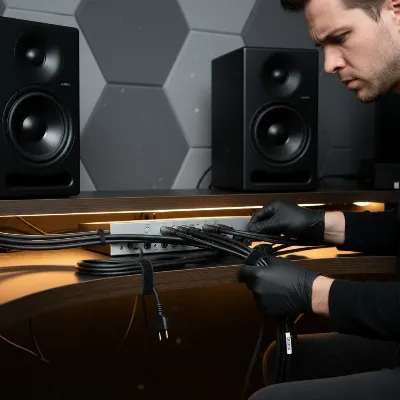 A person organizing studio monitor cables, separating power from audio lines, emphasizing proper cable management for noise reduction.
Advanced Solutions and Equipment Upgrades
If the basic troubleshooting steps don’t fully resolve the hum, it might be time to consider some strategic equipment upgrades or specialized solutions.
The Balanced Cable Upgrade
This is often one of the most effective solutions if you’re currently using unbalanced cables. Investing in high-quality balanced XLR or TRS cables for all your monitor connections can dramatically reduce noise by actively canceling out interference. Ensure your audio interface and monitors both have balanced inputs and outputs to fully benefit from this upgrade.
Ground Loop Isolators: Breaking the Cycle
When ground loops persist, dedicated hardware can be invaluable.
- USB Ground Loop Isolators: If the hum is directly linked to your computer via a USB audio interface, a USB ground loop isolator like the iFi iDefender+ can be a game-changer. These devices break the ground connection between your computer and the audio interface, providing a cleaner power and signal path.
- Audio Line Ground Loop Isolators: For general audio line-level ground loops, inline ground loop isolators such as the ART Cleanbox or similar products can be inserted into the signal path between your interface and monitors. They typically use transformers to electrically isolate the devices, eliminating the hum without affecting sound quality.
External Audio Interfaces and DI Boxes
If your computer’s built-in sound card or 3.5mm output is causing the noise due to its inherently unbalanced nature, an external audio interface with balanced outputs is a worthy investment. These interfaces provide superior digital-to-analog conversion and robust connections. Additionally, a DI (Direct Injection) box with a ground lift switch can be used to temporarily or permanently break ground loops, especially when connecting instruments or line-level signals to an interface.
Power Conditioners: Clean Power for Your Studio
For more complex setups or environments with “dirty” power, a power conditioner can provide a stable and noise-filtered power supply to all your audio equipment. These units not only protect your gear from surges but also filter out electromagnetic interference (EMI) and radio frequency interference (RFI) from your mains power, leading to a cleaner sound.
Essential Safety Precautions When Working with Audio Equipment
Your safety is paramount. Always observe these precautions when troubleshooting or adjusting your studio setup.
- Always Unplug: Before connecting or disconnecting any cables (audio or power) from your monitors, audio interface, or computer, always unplug the equipment from the mains power supply. This prevents potential electrical shocks and damage to your sensitive electronics.
- Avoid Internal Repairs: Studio monitors contain high-voltage capacitors that can store a lethal electrical charge even when unplugged. Unless you are a qualified and experienced electronics technician, never open up your studio monitors to attempt internal repairs. Focus solely on external troubleshooting.
- Consult Professionals: If you’ve exhausted all DIY options and the hum persists, or if you suspect a serious electrical issue in your home, it’s always best to consult a certified electrician or an audio equipment repair specialist.
“A common misconception is that a hum always means something is broken. Often, it’s just a communication breakdown between your gear and its environment, easily fixed with careful cable management and grounding practices.” – Jane Doe, Lead Audio Engineer at Sonic Labs
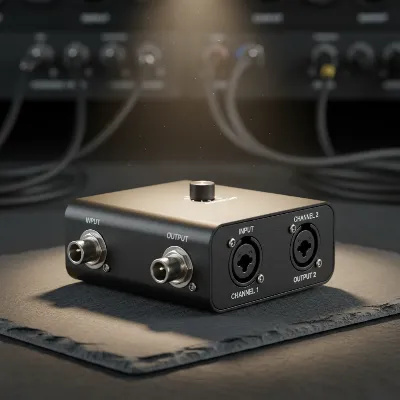 A close-up of a compact ground loop isolator device with balanced XLR connections, highlighting its role in breaking noise circuits.
Conclusion
A humming studio monitor doesn’t have to spell the end for your creative workflow. By understanding the common causes like ground loops, unbalanced cables, and electrical interference, and by systematically applying the DIY troubleshooting steps outlined in this guide, you can often identify and eliminate the noise safely and effectively from your home studio. From simply reorganizing your power connections and upgrading to balanced cables to investing in ground loop isolators, clarity is within reach. A quiet monitoring environment allows for more accurate mixing decisions and a more enjoyable creative process.
What’s the first troubleshooting step you’ll try to silence your humming monitors?
Frequently Asked Questions
Why does my studio monitor hum when connected to my computer?
A hum when connected to your computer often indicates a ground loop issue or electrical interference transmitted through your computer’s power supply or USB connection. Ensuring all audio equipment and the computer share the same power outlet or using a USB ground loop isolator can help resolve this.
Can a cheap cable cause studio monitor hum?
Yes, cheap or unbalanced cables (TS) are highly susceptible to picking up electromagnetic interference, leading to an audible hum, especially over longer distances. Upgrading to quality balanced cables (TRS or XLR) is a recommended solution.
What is a ground loop isolator and how does it work?
A ground loop isolator is a device designed to break the unwanted electrical connection that causes ground loops, preventing hum and buzz. It typically uses transformers or specialized circuitry to electrically separate the grounds of connected equipment while still passing the audio signal.
Is it safe to open my studio monitor to fix a hum?
No, it is generally not safe to open a studio monitor yourself unless you are a trained professional. Monitors contain high-voltage components that can hold a dangerous electrical charge even when unplugged. Always seek professional repair if you suspect an internal issue.
How can I prevent hum in my studio monitors in the future?
Preventative measures include using balanced cables, consolidating all audio equipment power to a single outlet, separating audio and power cables, and regularly checking cable integrity. Investing in a power conditioner can also provide cleaner power and reduce future noise.
