The JBL 305P MkII studio monitor remains a top choice in 2026 for home and project studios, offering professional-grade sound, precise stereo imaging, and robust features at an affordable price. This 5-inch active nearfield monitor delivers a frequency response of 49Hz–20kHz (±3 dB) and 82 watts of bi-amplified power, making it an excellent tool for critical mixing and recording tasks.
What Are Studio Monitors?
Studio monitors are specialized loudspeakers designed for critical listening in audio production environments. Unlike consumer-grade speakers, which are often “voiced” to enhance certain frequencies for a more pleasurable listening experience, studio monitors aim for a flat, uncolored frequency response. This neutrality is paramount because it allows engineers and producers to hear their audio material as accurately as possible, revealing imperfections in a mix that might otherwise be masked by exaggerated bass or boosted highs in consumer speakers. In music production, the ability to hear every detail without artificial enhancement is crucial for making informed decisions during recording, mixing, and mastering, ultimately leading to professional-sounding tracks that translate well across different playback systems.
Types of Studio Monitors
The world of studio monitors offers various configurations, each suited to different studio sizes and production needs. Understanding these types is key to selecting the right monitor for your workspace.
Active Studio Monitors
Active studio monitors are the most prevalent type in modern studios. They feature built-in amplifiers matched precisely to the drivers (woofers and tweeters). This integrated design ensures optimal power delivery, minimizes signal loss, and often includes sophisticated digital signal processing (DSP) for room correction and improved performance. The JBL 305P MkII, for instance, is an active monitor, simplifying setup and ensuring consistent sound quality. Their convenience and optimized performance make them a popular choice for home and professional studios alike.
Passive Studio Monitors
Passive studio monitors, in contrast, require an external amplifier. This setup offers flexibility, allowing users to pair different amplifiers with their speakers. However, it also introduces complexity, as finding the right amplifier to optimally drive passive monitors can be a challenge, and mismatched components can compromise sound quality. While less common in entry-level setups, passive monitors are still found in some high-end professional studios where specific amplifier characteristics are desired.
Nearfield Studio Monitors
Nearfield monitors are designed to be placed relatively close to the listener, typically within 3 to 5 feet, forming an equilateral triangle with the listener’s head. This close proximity minimizes the influence of room acoustics on the sound, providing a more direct and accurate listening experience. The JBL 305P MkII, with its 5-inch woofer, is an excellent example of a nearfield monitor, ideal for small to medium-sized studios and home setups where space is often a constraint. They excel at revealing intricate details in a mix.
Farfield Studio Monitors
|
Our Picks for the Best Studio Monitor in 2026
As an Amazon Associate I earn from qualifying purchases.
|
||
| Num | Product | Action |
|---|---|---|
| 1 | Yamaha HS3 Powered Studio Monitor in Black, Pair (HS3 B) |

|
| 2 | Mackie CR3.5 3.5" Creative Reference Powered Studio Monitors with Tone Knob and Location Switch — Active Speakers for Music Production, Desktop Computer, Gaming, HiFi Listening |
|
| 3 | PreSonus Eris E4.5-2-Way 4.5" Near Field Studio Monitor (Pair) |
|
| 4 | Edifier MR4 Powered Studio Monitor Speakers, 4" Active Near-Field Monitor Speaker - White (Pair) |
|
| 5 | (2) JBL 305P MkII 5" 2-Way Active Powered Studio Reference Monitors Speakers |
|
| 6 | Edifier R1280T Powered Bookshelf Speakers - 2.0 Active Near Field Studio Monitor Speaker - Wooden Enclosure - 42 Watts RMS Power |
|
| 7 | PreSonus Eris 3.5 Studio Monitors (White), Pair — 3.5" Inch Powered Bookshelf Speakers, Stereo, Desktop Computer, Near Field Music Production, Audio Mixing Recording |
|
| 8 | PreSonus Eris 3.5 Studio Monitors, Pair — Powered, Active Monitor Speakers for Near Field Music Production, Desktop Computer, Hi-Fi Audio |
|
| 9 | Yamaha HS4 Powered Studio Monitor in White, Pair (HS4 W) |
|
| 10 | PreSonus Eris E5 2-Way 5.25" Near Field Studio Monitor |
|
Farfield monitors, also known as main monitors, are larger, more powerful speakers intended for placement further away from the listener, often built into the studio walls. They are typically used in larger professional studios and control rooms to provide a broader soundstage and greater SPL (Sound Pressure Level) for evaluating overall mix translation and impact. While a 5-inch monitor like the 305P MkII is primarily nearfield, larger models like the JBL 308P MkII (with an 8-inch woofer) offer extended low-frequency response and higher output, better suited for midfield or even farfield applications in larger spaces.
Key Factors When Choosing Studio Monitors
Selecting the right studio monitor involves evaluating several critical specifications that directly impact sound quality and suitability for your environment.
Woofer Size
The woofer size significantly influences a monitor’s ability to reproduce low frequencies. A larger woofer generally pushes more air, resulting in deeper and more impactful bass response. The JBL 305P MkII features a 5-inch woofer, offering a remarkably tight, full, and punchy low end for its size. For home and project studios, a 5-inch woofer often strikes a good balance between bass extension and physical footprint. However, genres demanding deep sub-bass might benefit from pairing these monitors with a dedicated subwoofer for a full-range experience.
Frequency Response
Frequency response indicates the range of frequencies a speaker can reproduce and how accurately it does so. A flatter response across the audible spectrum (20 Hz to 20 kHz) is desirable in studio monitors, as it means the sound is not artificially colored. The JBL 305P MkII boasts a frequency response of 49Hz–20kHz (±3 dB), with an extended range down to 43Hz (-10 dB), which is considered excellent for its class. This relatively flat response allows for neutral and accurate sound reproduction, essential for critical mixing.
Power
The power rating, typically measured in watts, indicates how much power the monitor’s amplifier can deliver to its drivers. More power generally translates to higher maximum sound pressure levels (SPL) and better dynamic range without distortion. The 305P MkII is bi-amplified with a total of 82 watts (41W for the woofer and 41W for the tweeter), providing ample headroom for most nearfield mixing tasks. While it can produce significant volume, it is optimized for moderate to high listening levels in a nearfield setup, with internal limiting preventing excessive output that could compromise sound quality at extreme volumes.
Total Harmonic Distortion (THD)
Total Harmonic Distortion (THD) measures the level of unwanted harmonic frequencies added to the original signal by the speaker. A lower THD percentage indicates cleaner sound reproduction with less coloration and distortion. While specific THD figures for the 305P MkII are not always prominently advertised, the monitor is engineered to JBL’s Linear Spatial Reference design criteria, aiming for high accuracy and low distortion. Typically, professional-grade studio monitors strive for THD levels below 1%. Users generally report a clean and detailed sound from the 305P MkII, even at higher volumes, suggesting well-managed distortion.
Connectivity
Connectivity refers to the types of inputs available on the monitor, allowing it to connect to audio interfaces, mixers, and other studio equipment. The JBL 305P MkII offers versatile, balanced input options with both XLR and 1/4-inch TRS (Tip-Ring-Sleeve) connectors. These balanced connections are crucial for minimizing noise interference over longer cable runs, ensuring a clean signal path from your audio source to the monitors. An input sensitivity switch (+4 dBu / -10 dBV) allows for seamless integration with both professional and consumer-grade audio gear.
JBL 305P MkII Quality Test 2026: An In-Depth Review
The JBL 305P MkII continues to be a standout performer in 2026, building on a legacy of affordable quality. Our quality test reveals why it remains a top choice for home and project studios.
Sound Quality and Performance: The hallmark of the 305P MkII is its exceptional sound quality, particularly its stereo imaging and depth. Thanks to JBL’s patented Image Control Waveguide, these monitors create an expansive sweet spot, allowing you to perceive your mix in a three-dimensional space. Clarity and separation between instruments are impressive, especially in the midrange where vocals and guitars often reside. The low end, powered by its 5-inch woofer and patented Slip Stream low-frequency port, is tight, full, and surprisingly deep for its size, without being boomy if properly placed. High frequencies are smooth and detailed, avoiding harshness that can lead to listening fatigue during long sessions. While often described as “flattering” by some experienced engineers compared to ultra-neutral high-end monitors, the overall response is balanced and accurate for its price point, making it an excellent tool for mix translation.
Build Quality and Design: The 305P MkII features a sleek, modern design with a glossy front baffle and curved edges that blend seamlessly into any studio environment. The construction is robust, utilizing a solid MDF cabinet that effectively minimizes resonance, contributing to clean and accurate sound reproduction. Although compact, the monitors feel substantial and durable. The rear panel is thoughtfully laid out, offering balanced XLR and 1/4-inch TRS inputs, along with essential tuning controls for room calibration. While most users report excellent long-term durability, some minor cosmetic issues like layering coming off on corners have been noted after extended use.
Key Features: Beyond its core performance, the 305P MkII includes crucial features that enhance its versatility:
- Image Control Waveguide: Provides precise sound imaging and a wide sweet spot.
- Boundary EQ: A 3-position switch (-3 dB, -1.5 dB, 0 dB) helps compensate for bass build-up when monitors are placed near walls or corners, a common issue in untreated rooms.
- HF Trim: A 3-position switch (-2 dB, 0 dB, +2 dB) allows you to adjust high-frequency output to suit your room’s acoustics or personal preference.
- Slip Stream Low-Frequency Port: Located at the rear, this patented design ensures superior bass performance and reduces turbulence, even at higher volumes.
- Dual Integrated Class D Amplifiers: Deliver 82 watts of power for high output and dynamic range.
- Strenuous JBL 100-hour Full-Power Test: Ensures the monitors’ reliability and longevity under demanding conditions.
Common Issues and Considerations: While highly praised, the 305P MkII isn’t without its minor quirks. Some users report a slight, consistent hiss from the tweeters, especially audible at very low volumes or in quiet rooms, which is common for many budget-friendly active monitors. The rear-ported design necessitates placement a few inches away from walls to prevent bass frequencies from becoming overly exaggerated or “boomy.” Proper setup and room treatment are crucial to mitigate these effects and ensure optimal sound. Turning on your audio interface or computer before the monitors can also prevent occasional “pops” during power-up.
Overall, the JBL 305P MkII offers an unbeatable combination of precision, depth, and musicality at an accessible price point in 2026. Its powerful performance and detailed sound make it a trustworthy tool for mixing, recording, and creative work.
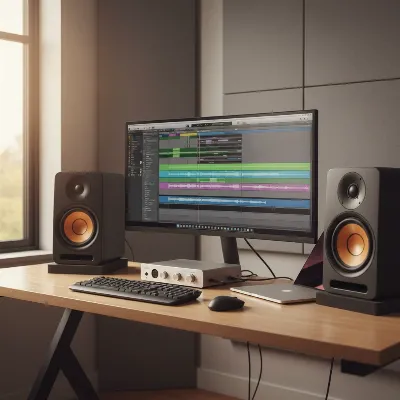 JBL 305P MkII studio monitors in a well-arranged home studio setup with an audio interface and computer screen.
Comparing Leading Studio Monitor Brands
The studio monitor market is competitive, with several brands vying for the attention of producers. While the JBL 305P MkII excels in its segment, understanding its position relative to other top brands helps in making an informed decision. JBL is renowned for its pro audio heritage, bringing technologies from its high-end reference monitors to more affordable lines like the 3-Series.
Brands like Yamaha (e.g., HS series) are often praised for their clinical, revealing sound, which some engineers prefer for identifying mix issues, though they can sometimes be perceived as less “musical.” KRK (e.g., Rokit series) monitors are known for their distinctive yellow cones and a slightly more colored, bass-forward sound profile that appeals to producers of bass-heavy genres, though this coloration might not be ideal for neutral mixing. Adam Audio, Genelec, and Focal represent the higher-end of the spectrum, offering exceptional clarity, flat frequency response, and advanced features, but at a significantly higher price point, targeting professional studios with larger budgets. The JBL 305P MkII carves out a niche by offering a balanced, detailed, and largely neutral sound that rivals more expensive options, making it a compelling value proposition.
Detailed Comparison: Best Studio Monitor Models
Choosing between excellent monitors often comes down to nuanced differences. Here’s a comparison of the JBL 305P MkII with some of its direct and indirect competitors:
| Feature/Model | JBL 305P MkII | KRK Rokit 5 G4 | JBL 308P MkII |
|---|---|---|---|
| Woofer Size | 5-inch | 5-inch | 8-inch |
| Total Power Output | 82 Watts (Bi-amped: 41W LF, 41W HF) | 55 Watts (Bi-amped: 30W LF, 25W HF) | 112 Watts (Bi-amped: 56W LF, 56W HF) |
| Frequency Response | 49Hz – 20kHz (±3 dB) | 43Hz – 40kHz (KRK App adjustable) | 45Hz – 20kHz (±3 dB) |
| Max SPL | 108 dB | 104 dB | 112 dB |
| Inputs | Balanced XLR, 1/4-inch TRS | Balanced XLR, 1/4-inch TRS, RCA | Balanced XLR, 1/4-inch TRS |
| Port Design | Rear-ported (Slip Stream™) | Front-ported | Rear-ported (Slip Stream™) |
| Key Features | Image Control Waveguide, Boundary EQ, HF Trim | DSP-driven room tuning (25 presets), LCD display | Image Control Waveguide, Boundary EQ, HF Trim |
| Sound Profile | Neutral, accurate, precise imaging, tight bass | Slightly colored, boosted bass/highs, good for tracking | Neutral, powerful bass, extended low-end |
| Ideal Use Case | Home/project studios, critical nearfield mixing | Beatmakers, electronic music, general listening | Larger studios, deeper bass, midfield listening |
| Price Point (Approx.) | Budget-friendly | Mid-range budget | Mid-range |
The JBL 305P MkII stands out with its superior imaging and neutral sound for its price, often preferred for critical mixing over the Rokit 5 G4’s more pronounced bass and highs. While the Rokit 5 G4 offers flexible front-porting and DSP tuning via an app, the 305P MkII’s acoustic controls are effective and intuitive. For those needing significantly more bass and SPL, the JBL 308P MkII is a natural upgrade, offering the same JBL sound signature with a larger driver and more power, suitable for bigger rooms or genres with demanding low frequencies.
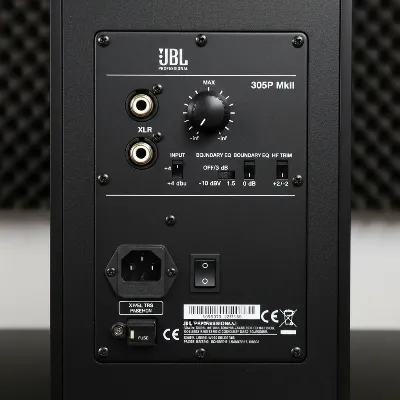 Close-up of the JBL 305P MkII rear panel showing input connections and EQ controls.
Buying Guide: How to Choose Your Studio Monitors
Choosing the right studio monitors is a crucial investment in your audio production setup. Here’s a comprehensive guide to help you make the best decision.
Determine Your Budget
Studio monitors come in a wide range of price points. It’s essential to set a realistic budget from the outset. Entry-level monitors like the JBL 305P MkII offer incredible value and professional performance without breaking the bank, typically falling into the budget-friendly category (under $200 per monitor). Mid-range options (e.g., some 8-inch models or higher-end 5-inch monitors) offer enhanced features and slightly better performance, while high-end monitors are a significant investment for professional studios. to factor in accessories like isolation pads and cables.
Identify Your Usage Needs
Consider what you’ll primarily be using your studio monitors for. Are you mixing, mastering, composing, or simply enjoying music critically? The size of your studio space is also a critical factor. For small home studios or bedrooms, a 5-inch nearfield monitor like the 305P MkII is often ideal, providing accurate sound without overwhelming the room or requiring extensive acoustic treatment. Larger rooms might benefit from 6-inch or 8-inch monitors for a more expansive sound and deeper bass.
Read Reviews and Comparisons
Thorough research is key. Consult reviews from reputable audio publications, professional producers, and long-term users. Look for detailed assessments of sound quality, build, and features. Pay attention to how monitors perform in different scenarios and how consistently positive the feedback is. Comparing various models side-by-side, as demonstrated in our comparison table, can highlight specific strengths and weaknesses relevant to your needs. Always cross-reference multiple sources to get a balanced perspective.
Test Before Buying (If Possible)
If circumstances allow, try to listen to monitors in person. Visit a local music store or a friend’s studio to hear different models. While your listening environment won’t be identical, it can give you a feel for the monitor’s sound signature, clarity, and overall impression. Pay attention to how individual instruments sound, the stereo image, and the bass response. Even a short listening session can help confirm if a particular monitor aligns with your personal preferences and needs.
Understand Warranty and Support
A good warranty and reliable customer support are valuable assets. Research the manufacturer’s warranty period and what it covers. Companies with strong customer service and readily available parts can save you headaches in the long run. JBL, as part of Harman International, typically offers robust support and a standard warranty, giving buyers confidence in their purchase. This ensures that you receive assistance if any issues arise after your purchase.
Setting Up and Using Your Studio Monitors Correctly
Even the best studio monitors will underperform if not set up correctly. Proper placement and room treatment are as important as the monitors themselves for achieving accurate sound.
Speaker Placement
Optimal speaker placement is crucial for accurate stereo imaging and frequency response. The widely recommended “equilateral triangle” principle dictates that your two monitors and your listening position should form an equilateral triangle. The tweeters should be at ear level, and the monitors should be angled slightly inward, pointing towards your ears. For rear-ported monitors like the JBL 305P MkII, ensure there’s a few inches of space between the back of the monitor and any walls to allow the bass port to breathe, preventing exaggerated low-end build-up. Placing monitors on isolation pads or stands is also highly recommended to decouple them from your desk, reducing unwanted vibrations and improving clarity.
Studio Acoustic Treatment
While good monitors provide a neutral sound, the room itself can significantly color what you hear. Reflections, standing waves, and bass build-up can lead to inaccurate mixing decisions. Basic acoustic treatment, such as bass traps in corners to control low frequencies and acoustic panels at first reflection points (on walls and ceiling) to absorb mid and high frequencies, can drastically improve your room’s sonic accuracy. Even simple measures like heavy curtains or bookshelves can help. The JBL 305P MkII’s built-in Boundary EQ and HF Trim controls are excellent tools to help compensate for less-than-ideal room acoustics, but they are not a substitute for proper treatment.
Speaker Calibration
Speaker calibration involves fine-tuning your monitors to achieve the flattest possible frequency response within your listening environment. This can be done manually using the monitor’s onboard EQ controls (like the 305P MkII’s Boundary EQ and HF Trim) or with dedicated room correction software and measurement microphones. The goal is to compensate for any dips or peaks in the frequency response caused by room acoustics, ensuring that what you hear is as true to the source material as possible. While the 305P MkII performs admirably out of the box, taking the time to calibrate can unlock its full potential for critical mixing.
Conclusion
The JBL 305P MkII continues to be a formidable contender in the studio monitor landscape for 2026, offering exceptional value and professional-grade performance that belies its affordable price. Its precise imaging, detailed sound, and robust features make it an outstanding choice for home and project studios looking for accuracy and reliability. While it’s best suited for nearfield applications and benefits from thoughtful placement and basic room treatment, its sonic capabilities are truly impressive for a 5-inch monitor. For those stepping into serious audio production or upgrading from lesser speakers, the 305P MkII delivers a trustworthy monitoring experience. What are your priorities when choosing studio monitors for your creative space?
Frequently Asked Questions
Frequently Asked Questions
Is the JBL 305P MkII suitable for mastering audio projects?
While the JBL 305P MkII offers excellent detail and a relatively flat response, dedicated mastering studios often opt for larger, full-range monitors. For home or project studio mastering, the 305P MkII can serve as a competent tool, especially when paired with a quality subwoofer to accurately monitor sub-bass frequencies.
Do JBL 305P MkII monitors include audio connection cables?
No, the JBL 305P MkII monitors are sold individually and do not typically include audio cables. You will need to purchase balanced XLR or 1/4-inch TRS cables separately to connect them to your audio interface or mixer. Investing in good quality balanced cables is recommended for optimal signal integrity.
What are the main differences between the JBL 305P MkII and the original LSR305?
The JBL 305P MkII is an evolution of the original LSR305, featuring refined transducers for improved transient response and linearity. It also includes updated Boundary EQ settings for better room compensation. While retaining the core sound signature and Image Control Waveguide, the MkII offers subtle enhancements for a more accurate listening experience.
What is the ideal woofer size for a home studio monitor?
For most small home and project studios, a 5-inch woofer, like that found in the JBL 305P MkII, often strikes a good balance between bass extension and physical footprint. This size provides a tight, full, and punchy low end without overwhelming the room or requiring extensive acoustic treatment.
How much power does the JBL 305P MkII studio monitor have?
The JBL 305P MkII is bi-amplified with a total of 82 watts of power, delivering 41W to the woofer and 41W to the tweeter. This provides ample headroom for most nearfield mixing tasks and allows for significant volume without distortion, optimized for moderate to high listening levels.
How to Choose Studio Monitors for Your Setup
Selecting the right studio monitors is crucial for accurate audio production. Follow these steps to make an informed decision for your home or project studio.
Set a realistic budget from the outset, considering that entry-level monitors like the JBL 305P MkII offer professional performance under $200 per monitor. Remember to factor in accessories such as isolation pads and cables.
Consider your primary use (mixing, mastering, composing) and the size of your studio space. A 5-inch nearfield monitor is ideal for small home studios, while larger rooms might benefit from 6-inch or 8-inch monitors for deeper bass.
Conduct thorough research by consulting reviews from reputable audio publications and professional users. Pay attention to sound quality, build, and features, and cross-reference multiple sources for a balanced perspective.
If circumstances allow, listen to different monitor models in person at a music store or friend's studio. Pay attention to individual instrument clarity, stereo image, and bass response to confirm alignment with your preferences.
Research the manufacturer's warranty period and customer support. Companies like JBL, part of Harman International, typically offer robust support and a standard warranty, providing confidence in your purchase.
