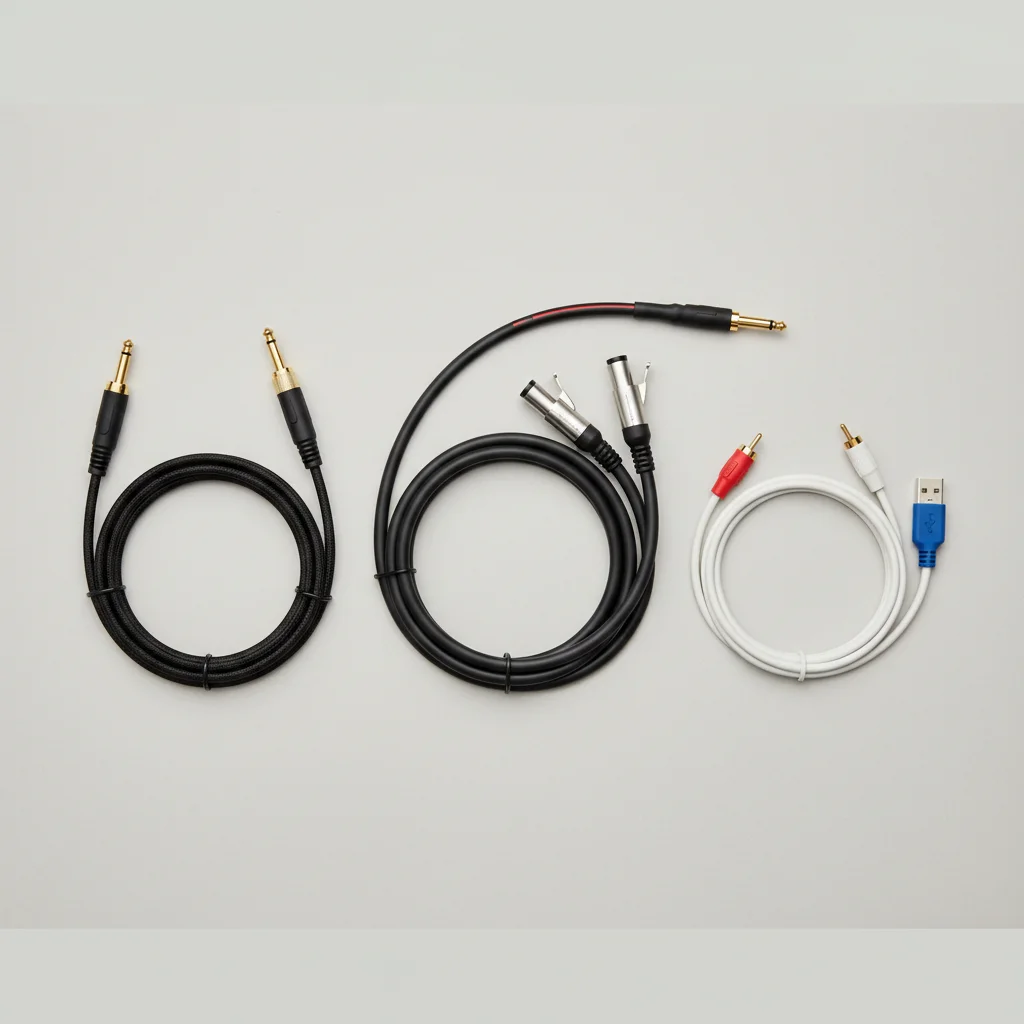
Choosing the right studio monitor cables is crucial for optimal audio quality. For most studio setups, TRS (Tip-Ring-Sleeve) and XLR cables are the best choices because they offer balanced connections, which significantly reduce noise and interference. RCA cables, while common in consumer gear, are unbalanced and generally not recommended for critical studio listening due to their susceptibility to noise.
Understanding Balanced vs. Unbalanced Cables
The fundamental difference between cable types lies in whether they are balanced or unbalanced. Unbalanced cables, like RCA, have two conductors: a signal wire and a ground wire. This design makes them susceptible to electromagnetic interference, which can introduce hum or noise, especially over longer runs. Balanced cables, such as TRS and XLR, feature three conductors: two signal wires (one in-phase, one out-of-phase) and a ground wire. This configuration allows the receiving device to cancel out any noise picked up along the cable, resulting in a cleaner signal.
For home studios or setups with shorter cable runs (under 10 feet), unbalanced cables might be acceptable. However, for any professional application or when dealing with longer distances, balanced cables are highly recommended to maintain signal integrity and minimize unwanted noise.
TRS Cables: Versatility and Common Use
TRS cables are characterized by their 1/4-inch jack with three conductors. They can be used for both balanced and unbalanced connections, depending on the equipment. When connecting a balanced output to a balanced input, a TRS cable provides a balanced signal. Many audio interfaces and studio monitors feature 1/4-inch TRS inputs, making them a very common choice. They are particularly popular for connecting audio interfaces to active studio monitors.
The versatility of TRS cables makes them a staple in many studio setups. They are robust and provide a secure connection, reducing the risk of accidental disconnections during use.
XLR Cables: The Professional Standard
|
Our Picks for the Best Studio Monitor in 2026
As an Amazon Associate I earn from qualifying purchases.
|
||
| Num | Product | Action |
|---|---|---|
| 1 | Yamaha HS3 Powered Studio Monitor in Black, Pair (HS3 B) |

|
| 2 | Edifier MR4 Powered Studio Monitor Speakers, 4" Active Near-Field Monitor Speaker - White (Pair) |
|
| 3 | PreSonus Eris E4.5-2-Way 4.5" Near Field Studio Monitor (Pair) |
|
| 4 | Mackie CR3.5 3.5" Creative Reference Powered Studio Monitors with Tone Knob and Location Switch — Active Speakers for Music Production, Desktop Computer, Gaming, HiFi Listening |
|
| 5 | Yamaha HS4 Powered Studio Monitor in White, Pair (HS4 W) |
|
| 6 | PreSonus Eris 3.5 Studio Monitors, Pair — Powered, Active Monitor Speakers for Near Field Music Production, Desktop Computer, Hi-Fi Audio |
|
| 7 | PreSonus Eris 3.5 Studio Monitors (White), Pair — 3.5" Inch Powered Bookshelf Speakers, Stereo, Desktop Computer, Near Field Music Production, Audio Mixing Recording |
|
| 8 | (2) JBL 305P MkII 5" 2-Way Active Powered Studio Reference Monitors Speakers |
|
| 9 | PreSonus Eris E5 2-Way 5.25" Near Field Studio Monitor |
|
| 10 | Edifier R1280T Powered Bookshelf Speakers - 2.0 Active Near Field Studio Monitor Speaker - Wooden Enclosure - 42 Watts RMS Power |
|
XLR cables are another type of balanced cable, easily recognizable by their three-pin connector. They are widely considered the professional standard for audio connections due to their extremely reliable and secure locking mechanism, which prevents accidental disconnections. XLR cables are excellent at rejecting noise over long distances, making them ideal for larger studios or live sound applications where cable runs can be extensive.
Many high-end studio monitors and audio interfaces feature XLR inputs and outputs. If your equipment supports XLR, it’s often the preferred choice for the most robust and interference-free connection possible.
RCA Cables: Best for Consumer Gear
RCA cables are typically found in consumer audio equipment, such as home stereo systems or DJ mixers. They are unbalanced cables, meaning they are more prone to picking up interference. While some entry-level studio monitors might include RCA inputs, they are generally not recommended for critical listening or professional studio environments due to their susceptibility to noise, especially over longer cable lengths. If you must use RCA, keep the cable runs as short as possible.
Choosing the Right Cable for Your Setup
When selecting cables, always prioritize balanced connections (TRS or XLR) if your equipment supports them. Check the input and output types on your audio interface and studio monitors to ensure compatibility. For most home studio setups, TRS cables are a practical and effective choice. For professional environments or longer cable runs, XLR cables offer superior performance and reliability.
- Identify the output type on your audio interface (e.g., 1/4-inch TRS, XLR).
- Identify the input type on your studio monitors (e.g., 1/4-inch TRS, XLR, RCA).
- Prioritize balanced connections (TRS or XLR) for optimal sound quality.
- Consider cable length; shorter runs are generally better, especially for unbalanced cables.
- Invest in good quality cables to minimize signal degradation and noise.
Frequently Asked Questions
What are the main types of cables used for studio monitors?
There are three primary types of cables commonly used for connecting studio monitors: TRS (Tip-Ring-Sleeve), XLR, and RCA. TRS and XLR cables offer balanced connections, while RCA cables are unbalanced.
Why are balanced cables preferred over unbalanced cables for studio monitors?
Balanced cables, such as TRS and XLR, feature three conductors that allow the receiving device to cancel out noise picked up along the cable. Unbalanced cables, like RCA, have only two conductors, making them more susceptible to electromagnetic interference and noise, especially over longer runs exceeding 10 feet.
When should I use TRS cables for my studio monitor setup?
TRS cables are a versatile and common choice for connecting audio interfaces to active studio monitors, especially in home studio setups. They provide a balanced signal when connecting balanced outputs to balanced inputs, and many audio interfaces and monitors feature 1/4-inch TRS inputs.
What makes XLR cables the professional standard for audio connections?
XLR cables are considered the professional standard due to their extremely reliable and secure three-pin locking mechanism, which prevents accidental disconnections. They are excellent at rejecting noise over long distances, making them ideal for larger studios or live sound applications where cable runs can be extensive.
Are RCA cables suitable for professional studio monitor use?
RCA cables are generally not recommended for critical listening or professional studio environments. As unbalanced cables, they are more prone to picking up interference and noise, especially over longer cable lengths. They are typically found in consumer audio equipment rather than professional studio gear.
Choosing the Right Studio Monitor Cables
Selecting the correct cables for your studio monitors is essential for optimal audio quality and to minimize unwanted noise. Follow these steps to ensure you pick the best type for your setup.
First, check the output type on your audio interface (e.g., 1/4-inch TRS, XLR) and the input type on your studio monitors (e.g., 1/4-inch TRS, XLR, RCA). This ensures compatibility between your devices.
Always choose balanced connections (TRS or XLR) if your equipment supports them. Balanced cables significantly reduce noise and interference, providing a cleaner signal compared to unbalanced RCA cables.
Keep cable runs as short as possible, especially if you are using unbalanced cables. Shorter cables are less susceptible to picking up electromagnetic interference, which can degrade audio quality.
Opt for good quality cables to minimize signal degradation and noise. While budget cables might seem appealing, a small investment in better cables can make a noticeable difference in your audio production.

Always used RCA cables for my old setup, but when I upgraded my monitors, I decided to try TRS. The improvement in clarity is noticeable, and I don’t have that annoying buzz anymore. Definitely worth the investment for a cleaner signal path.
I used to think all cables were the same, but after learning about the balanced vs. unbalanced difference, I finally understood why my old RCA setup was so noisy. Upgraded to some decent XLRs, and my audio is crystal clear. No more unwanted hum or interference, even with longer cable runs.
I picked up some new TRS cables for my setup, hoping to get rid of some interference. While they did help a bit, I still get a slight hum sometimes, especially when my phone is near. Maybe my runs are too long, or I just need to check my grounding. They’re good, but not a total miracle worker for my specific issue.
I was getting so much hum in my home studio, especially when I moved my monitors around. Switched to XLR cables after reading about balanced connections, and it’s night and day. Seriously, the difference in noise reduction is incredible. My mixes sound so much cleaner now.