For home studio owners, finding high-quality studio monitors under $200 is entirely possible in 2026, with models like the PreSonus Eris E3.5 and Edifier MR4 offering exceptional accuracy and clarity. These budget-friendly active nearfield monitors provide a flat frequency response crucial for mixing, making them a significant upgrade over consumer speakers for budding producers and sound engineers.
What is a Studio Monitor?
A studio monitor is a specialized loudspeaker designed for professional audio production, engineered to reproduce sound as accurately and neutrally as possible. Unlike consumer-grade speakers, which often color the sound with boosted bass or treble for a more “pleasant” listening experience, studio monitors aim for a flat frequency response. This means they don’t exaggerate certain frequencies, allowing engineers to hear the true characteristics of their audio without embellishment.
The primary distinction between studio monitors and regular speakers lies in their purpose. Regular speakers are built for enjoyment, often with internal equalization designed to make music sound good to the average listener. Studio monitors, however, are tools for critical listening. They are designed to expose imperfections in a mix, ensuring that a track will sound balanced and professional on various playback systems, from headphones to car stereos. For anyone serious about creating, mixing, or mastering audio, accurate monitoring is paramount. Without it, you’re essentially mixing blind, making decisions based on an inaccurate representation of your sound.
Common Types of Studio Monitors
Understanding the different types of studio monitors available will help you choose the right fit for your specific needs and studio environment. For budget-conscious home studio owners, nearfield active monitors are almost always the recommended choice.
Active Studio Monitors
Active studio monitors come with built-in amplifiers matched precisely to the drivers within the speaker cabinet. This integration ensures optimal performance, as the amplifier and drivers are designed to work seamlessly together, often resulting in better sound quality and efficiency. The advantages include a simpler setup, as you don’t need to purchase or match external amplifiers, and typically better sound fidelity due to the optimized internal components. The main disadvantage is that if a component fails, the entire unit may need servicing. For most home studio setups, active monitors are the preferred and most practical solution.
Passive Studio Monitors
Passive studio monitors, conversely, require an external power amplifier to operate. This setup offers greater flexibility for users who prefer to experiment with different amplifiers or already own a high-quality amp. While passive monitors can be a good choice for larger, more complex studio configurations, they introduce additional cost and complexity for home users due to the need for a separate amplifier and speaker cabling. They are less common in the budget segment, as pairing a quality passive monitor with an appropriate amplifier typically exceeds a $200 budget.
Nearfield Studio Monitors
|
Our Picks for the Best Studio Monitor in 2026
As an Amazon Associate I earn from qualifying purchases.
|
||
| Num | Product | Action |
|---|---|---|
| 1 | Edifier MR4 Powered Studio Monitor Speakers, 4" Active Near-Field Monitor Speaker - White (Pair) |

|
| 2 | (2) JBL 305P MkII 5" 2-Way Active Powered Studio Reference Monitors Speakers |
|
| 3 | Yamaha HS4 Powered Studio Monitor in White, Pair (HS4 W) |
|
| 4 | Yamaha HS3 Powered Studio Monitor in Black, Pair (HS3 B) |
|
| 5 | PreSonus Eris 3.5 Studio Monitors (White), Pair — 3.5" Inch Powered Bookshelf Speakers, Stereo, Desktop Computer, Near Field Music Production, Audio Mixing Recording |
|
| 6 | PreSonus Eris 3.5 Studio Monitors, Pair — Powered, Active Monitor Speakers for Near Field Music Production, Desktop Computer, Hi-Fi Audio |
|
| 7 | Edifier R1280T Powered Bookshelf Speakers - 2.0 Active Near Field Studio Monitor Speaker - Wooden Enclosure - 42 Watts RMS Power |
|
| 8 | PreSonus Eris E5 2-Way 5.25" Near Field Studio Monitor |
|
| 9 | PreSonus Eris E4.5-2-Way 4.5" Near Field Studio Monitor (Pair) |
|
| 10 | Mackie CR3.5 3.5" Creative Reference Powered Studio Monitors with Tone Knob and Location Switch — Active Speakers for Music Production, Desktop Computer, Gaming, HiFi Listening |
|
Nearfield monitors are designed to be placed relatively close to the listener, typically within 3-5 feet (1-1.5 meters). Their primary benefit is that they minimize the impact of room acoustics on the sound you hear, providing a direct and accurate soundstage. This makes them ideal for small to medium-sized home studios where extensive acoustic treatment might not be feasible. Most budget studio monitors fall into this category, offering excellent detail and stereo imaging for critical mixing and mastering tasks. They are crucial for hearing precise details without reflections from your room interfering too much.
Farfield Studio Monitors
Farfield monitors are much larger and designed for placement at a greater distance from the listener, typically in large, acoustically treated control rooms. They are capable of much higher sound pressure levels (SPLs) and offer a broader, more expansive soundstage, often used for referencing mixes in a larger context or for film scoring. Due to their size, power requirements, and cost, farfield monitors are generally beyond the scope of a budget home studio and a $200 price point.
Key Factors When Choosing Studio Monitors
When navigating the options for budget studio monitors, several critical factors will influence your choice, impacting sound quality, suitability for your space, and overall performance. Prioritizing these elements will help you select monitors that genuinely meet your needs without overspending.
Woofer Size
The size of a monitor’s woofer, typically measured in inches, largely dictates its ability to reproduce low frequencies (bass). Smaller woofers (3-inch to 4.5-inch) are excellent for tight, transient bass but may not extend into the very lowest frequencies. Larger woofers (5-inch to 8-inch) offer a more extended and powerful bass response. For home studios under $200, you’ll primarily find monitors with 3-inch, 3.5-inch, 4-inch, or 4.5-inch woofers. Smaller rooms generally benefit from smaller woofers, as larger ones can excite room modes and create an exaggerated, inaccurate bass response. Consider your room size and the genres you work with; if deep bass is crucial, a slightly larger woofer or a dedicated subwoofer (a future upgrade) might be necessary.
Frequency Response
Frequency response refers to the range of frequencies a speaker can reproduce and how evenly it reproduces them. A “flat” frequency response is the holy grail for studio monitors, meaning all frequencies from low to high are reproduced at roughly the same volume without artificial boosts or cuts. This neutrality is vital for making accurate mixing decisions. While truly flat response is often found in higher-end models, many budget monitors offer a remarkably balanced response that is a significant improvement over consumer speakers. Always look for a wide frequency range (e.g., 50 Hz – 20 kHz) and user reviews that praise a monitor’s neutrality and clarity across the spectrum.
Power
The power rating of a studio monitor, measured in watts, indicates how loud it can play without distortion. For active monitors, this refers to the built-in amplifier’s power. For a small to medium home studio, a pair of monitors with a combined power output of 30-70 watts RMS (Root Mean Square) per side is usually more than sufficient. You don’t need immense volume for critical listening; consistent, clean power is more important. Overpowering your room with excessively loud monitors can lead to ear fatigue and inaccurate mixes. The goal is clarity, not deafening volume.
Total Harmonic Distortion (THD)
Total Harmonic Distortion (THD) measures the level of unwanted harmonics added to the original sound signal by the speaker. Lower THD values indicate a cleaner, more accurate sound reproduction. While manufacturers don’t always prominently display THD for budget models, it’s an important metric. Generally, a THD of less than 0.1% at moderate listening levels is considered very good for studio monitors. High THD can lead to a muddy or harsh sound, making it difficult to discern fine details in your mix.
Connectivity
Connectivity options are crucial for integrating your monitors into your existing setup. Common connection types found on budget studio monitors include:
- XLR (balanced): Offers the best signal integrity, minimizing noise over long cable runs. Ideal for professional interfaces.
- TRS (balanced/unbalanced): A 1/4-inch jack, can be balanced (TRS) for noise rejection or unbalanced (TS) for shorter runs. Common on audio interfaces.
- RCA (unbalanced): Often found on consumer audio gear, suitable for shorter cables but more susceptible to interference.
- Bluetooth: Increasingly common on budget monitors for casual listening, though generally not recommended for critical mixing due to potential latency and compression.
Ensure your chosen monitors have inputs that match your audio interface or mixer to avoid needing adapters, which can sometimes degrade signal quality. Most budget models will offer a combination of TRS and RCA inputs, with some including XLR.
Top Budget Studio Monitors Under $200 in 2026
Finding truly accurate studio monitors for under $200 for a pair can be challenging, but several models consistently deliver outstanding value, punching well above their weight class. These options are ideal for beginners, home producers with limited space, or anyone needing reliable monitoring on a tight budget.
| Model | Woofer Size (per speaker) | Power (per speaker) | Connectivity | Key Feature | Ideal For |
|---|---|---|---|---|---|
| PreSonus Eris E3.5 | 3.5-inch | 25W | TRS, RCA, Aux In, Headphone Out | Clear mids, wide stereo image, front-panel controls | Beginners, small desks, casual listening, podcasting |
| PreSonus Eris E4.5 | 4.5-inch | 25W | TRS, RCA, Aux In, Headphone Out | More authority in low-end, wider soundstage | Small to medium rooms, balanced mixing/listening |
| Mackie CR3-X/CR4-X | 3-inch / 4-inch | 50W (peak, per pair) | TRS, RCA, Aux In, Headphone Out | Versatile (multimedia/studio), good for small spaces | Mixed use (gaming, media, casual mixing), tight budget |
| Edifier MR4 | 4-inch | 21W | TRS, RCA | Clean sound, minimal fatigue, musical character | Everyday listening, casual mixing, balanced sound |
| IK Multimedia iLoud Micro Monitor | 3-inch | 25W | TRS, RCA, Bluetooth, Aux In | Incredibly compact, powerful for size, accurate | Very small desks, portable setups, critical listening on the go |
PreSonus Eris E3.5: Often hailed as one of the best entry points into true studio monitoring, the Eris E3.5 delivers impressive clarity, especially in the midrange. They provide a clear and honest representation of your audio, allowing instruments to separate cleanly. Their compact size makes them perfect for small desk setups, and convenient front-panel controls enhance usability. While the bass response is tight rather than deep, they offer discipline and accuracy crucial for beginners.
PreSonus Eris E4.5: Stepping up in size, the Eris E4.5 offers a more expansive sound with increased low-end authority compared to its smaller sibling. These monitors strike a great balance between accuracy for mixing and enjoyable sound for listening. They are well-suited for small to medium-sized rooms, providing a room-filling sound without sacrificing control.
Mackie CR3-X/CR4-X: The Mackie CR-X series provides versatile multimedia monitors that can pull double duty for casual mixing and general media consumption. The CR3-X and CR4-X models offer decent sound quality for their price point, with clear mids and highs. While they may lack the deep bass required for genres like EDM, they are a solid choice for beginners and those needing an all-around speaker system.
Edifier MR4: The Edifier MR4 stands out for its clean sound profile and ability to deliver clarity without causing listening fatigue. They offer a musical rather than strictly analytical sound, which can be appealing for extended listening sessions while still providing sufficient accuracy for basic mixing tasks. Their design leans towards a balanced, enjoyable sound experience.
IK Multimedia iLoud Micro Monitor: Despite their incredibly small footprint, the iLoud Micro Monitors deliver a surprisingly powerful and accurate sound. They are highly regarded for their impressive sound quality and wide frequency response, making them an excellent choice for producers tight on space or those who need a portable, yet critical, listening solution. Their compact size and robust sound make them a unique contender in the budget category, often just nudging the $200 mark for a pair but for their performance-to-size ratio.
A Note on Other Popular Monitors (Often Over Budget for a Pair): You might frequently encounter recommendations for models like the JBL 305P MkII, Kali Audio LP-6 V2, KRK Rokit 5 G4/G5, and Yamaha HS5 in “best budget studio monitors” discussions. While these are exceptional monitors for their respective price points and often offer superior accuracy and bass extension, it’s crucial to understand that they typically cost $150-$200 per single monitor. Therefore, a pair would push well beyond the $200 budget. If your budget can stretch to $300-$400 for a pair, these monitors represent excellent investments for a significant step up in quality. However, for a strict under-$200-a-pair budget, the options listed in the table above are your best bets.
Buying Guide: How to Get the Most from Your Budget Monitors
Choosing studio monitors, even on a budget, requires a thoughtful approach. By considering your personal circumstances and priorities, you can ensure your investment yields the best possible results for your audio projects.
Set Your Budget Realistically
Before diving in, clearly define your budget. For under $200, you’re looking at entry-level nearfield active monitors, most likely with 3-inch to 4.5-inch woofers. This price point typically includes a pair of monitors. Understand that while these options offer significant improvements over consumer speakers, they won’t compete with high-end professional monitors. Your $200 will buy you accuracy and clarity suitable for learning and producing in a home environment. Prioritize models known for flat frequency response and good build quality, as these foundational elements are key to reliable mixing.
Consider Your Usage Needs
What will you primarily use your studio monitors for?
- Mixing/Mastering: You need the most neutral and accurate sound possible. Focus on flat frequency response and good stereo imaging.
- Music Production/Arrangement: While accuracy is important, a monitor that is also enjoyable for long creative sessions might be a factor.
- Voiceover/Podcasting: Midrange clarity and minimal self-noise are key. Deep bass isn’t as critical.
- General Multimedia/Gaming: Versatility and decent overall sound are more important than absolute neutrality.
Also, consider your room size. Smaller rooms (e.g., bedrooms, small offices) are better suited for monitors with smaller wooffers (3-inch to 4.5-inch) to avoid bass build-up and muddy sound. Larger woofers can overwhelm small spaces.
Read Reviews and Comparisons
Research is your best friend. Look for reviews from reputable audio publications, professional engineers, and fellow home studio enthusiasts. Pay attention to consistent praise or criticism across multiple sources regarding sound accuracy, bass response, build quality, and connectivity. Forums and YouTube reviews can also offer real-world perspectives. Cross-referencing information helps build a comprehensive picture of a monitor’s strengths and weaknesses.
Try Before You Buy – If Possible
If circumstances allow, try to listen to monitors in person. Visit a local music store or a friend’s studio. Listen to tracks you know intimately across different genres, focusing on how vocals sit, the clarity of instruments, and the tightness of the bass. What sounds good to one person might not feel right to another. Your ears are the ultimate judge. “When testing monitors, always listen to familiar tracks that you know inside and out, especially ones you’ve mixed yourself. This allows you to immediately identify how a new monitor translates your work.” – Sarah Chen, Audio Engineer & Studio Consultant.
Understand Warranty and Support
Even budget gear should come with reliable support. Check the manufacturer’s warranty period and their reputation for customer service. A good warranty offers peace of mind and protects your investment should any issues arise. Reputable brands typically offer at least a 1-year warranty. Look for brands known for responsiveness and readily available spare parts or repair services.
How to Set Up and Use Studio Monitors Correctly
Even the best budget monitors won’t perform optimally if not set up correctly. Proper placement and basic acoustic considerations can dramatically improve your listening accuracy and the quality of your mixes.
Speaker Placement
The “equilateral triangle” principle is fundamental to studio monitor placement. Imagine an equilateral triangle where you, the listener, form one point, and each monitor forms the other two.
- Distance: Place your monitors so they are equidistant from each other and from your listening position, typically 3-5 feet (1-1.5 meters) away.
- Height: Position the tweeters at ear level when you are in your primary mixing position. This ensures the high frequencies are directed straight to your ears.
- Angle: Angle the monitors inward so they point directly at your head.
- Boundaries: Avoid placing monitors directly against walls or in corners, as this can exaggerate bass frequencies. Give them some space (at least 6-12 inches) from boundary surfaces if possible. Using isolation pads or stands can also decouple them from your desk, reducing unwanted vibrations.
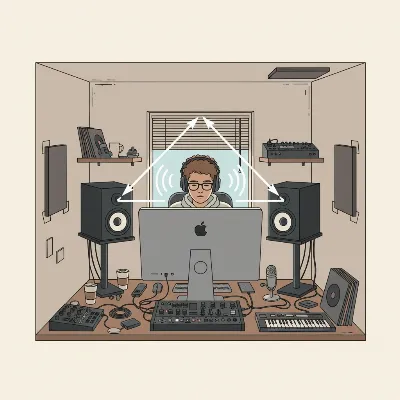 Optimal studio monitor placement showing the equilateral triangle principle in a home studio.
Room Acoustic Treatment
Even with excellent monitors, an untreated room can severely distort what you hear. Reflections, standing waves, and bass buildup can create an inaccurate listening environment. While full acoustic treatment can be costly, basic steps can make a big difference:
- Bass Traps: Place bass traps in corners to control low-frequency buildup. Even DIY solutions can help.
- Absorption Panels: Install acoustic panels at your primary reflection points (side walls, ceiling, front wall behind monitors) to reduce flutter echo and early reflections.
- Diffusion: In larger rooms, diffusers can scatter sound waves, creating a more spacious sound. (Less critical for small budget studios).
- Soft Furnishings: Curtains, rugs, and bookshelves can passively help absorb sound and break up reflections.
Calibration
Monitor calibration aims to achieve a flat frequency response at your listening position. While professional calibration involves specialized measurement microphones and software, home users can start with simpler methods:
- Room Correction Software: Some audio interfaces or dedicated software (e.g., Sonarworks SoundID Reference, though often outside a strict $200 budget) can measure your room’s acoustic profile and create an EQ curve to flatten the response.
- Built-in EQ Controls: Many budget monitors include simple high-frequency or low-frequency trim switches on the back. Use these sparingly to compensate for obvious room issues, such as reducing bass if your room over-emphasizes it.
- Reference Tracks: Continuously reference your mixes against professionally mixed and mastered tracks you know well. This helps train your ears to identify what a balanced mix should sound like in your space.
Conclusion
Choosing the best budget studio monitors under $200 in 2026 is about making smart, informed decisions that maximize your investment. While you won’t get the absolute pinnacle of audio fidelity at this price point, you can certainly find monitors that provide a far more accurate and reliable listening experience than standard consumer speakers. By understanding the core principles of studio monitor design, prioritizing factors like frequency response and connectivity, and carefully selecting from top-performing models like the PreSonus Eris series, Mackie CR-X line, or Edifier MR4, you can significantly improve your home studio’s capabilities. The goal is clarity and honesty in sound, allowing you to craft mixes that translate well everywhere. With the right budget monitors and a thoughtful setup, you’re well on your way to making better-sounding music.
What steps will you take to optimize your budget studio monitor setup?
Frequently Asked Questions
How much power do I really need for home studio monitors under $200?
For home studio monitors under $200, a power output of 20-30 watts RMS per speaker is generally sufficient. The key is clean, consistent power rather than sheer volume. In smaller rooms, excessive wattage can lead to overly loud and inaccurate monitoring, causing ear fatigue and masking crucial details in your mix. Focus on clarity and a balanced sound rather than high decibels.
Should I choose a monitor with Bluetooth for my budget home studio?
While convenient for casual listening, Bluetooth connectivity is generally not recommended for critical mixing tasks in a home studio. Bluetooth can introduce latency and apply compression to the audio signal, compromising the accuracy needed for precise mixing decisions. For serious audio work, always prioritize wired connections like TRS or RCA to maintain the highest fidelity of your sound.
Frequently Asked Questions
What defines a studio monitor compared to regular speakers?
A studio monitor is a specialized loudspeaker designed for professional audio production, engineered to reproduce sound as accurately and neutrally as possible with a flat frequency response. Regular speakers, conversely, are built for enjoyment and often color the sound with boosted bass or treble, making them unsuitable for critical mixing decisions.
What woofer size is best for budget studio monitors in a small room?
For budget studio monitors in a small room, woofers between 3-inch and 4.5-inch are generally ideal. Smaller woofers prevent bass buildup and muddy sound that larger woofers can create in confined spaces, ensuring a more accurate low-frequency representation for mixing.
How much power do I really need for home studio monitors under $200?
For home studio monitors under $200, a power output of 20-30 watts RMS per speaker is generally sufficient. The key is clean, consistent power rather than sheer volume. In smaller rooms, excessive wattage can lead to overly loud and inaccurate monitoring, causing ear fatigue and masking crucial details in your mix. Focus on clarity and a balanced sound rather than high decibels.
Should I choose a monitor with Bluetooth for my budget home studio?
While convenient for casual listening, Bluetooth connectivity is generally not recommended for critical mixing tasks in a home studio. Bluetooth can introduce latency and apply compression to the audio signal, compromising the accuracy needed for precise mixing decisions. For serious audio work, always prioritize wired connections like TRS or RCA to maintain the highest fidelity of your sound.
What is the 'equilateral triangle' principle for monitor placement?
The 'equilateral triangle' principle is a fundamental guideline for studio monitor placement where you, the listener, form one point, and each monitor forms the other two points of an equilateral triangle. This means monitors should be equidistant from each other and from your listening position, typically 3-5 feet away, with tweeters at ear level and angled directly at your head.
Are higher-end monitors like JBL 305P MkII available under $200?
No, higher-end monitors like the JBL 305P MkII, Kali Audio LP-6 V2, KRK Rokit 5 G4/G5, and Yamaha HS5 typically cost $150-$200 per single monitor. This means a pair would push well beyond a strict $200 budget. For that price point, options like the PreSonus Eris series or Edifier MR4 are more suitable.

I was really skeptical about getting decent monitors for under $200, but the PreSonus Eris E3.5 totally blew me away. The clarity is fantastic for my home studio setup. I’m just starting out with mixing, and these have been a game-changer compared to my old consumer speakers. Definitely recommend them if you’re on a tight budget.
The Edifier MR4s are solid for the price. I needed something with a flat frequency response for my small production space, and these deliver. They’re a huge step up from what I was using before. My only minor gripe is that the bass can feel a little light sometimes, but for nearfield listening, they’re more than adequate.
As a budding sound engineer, getting monitors that accurately reproduce sound without coloring it was crucial. These budget studio monitors have been perfect for my needs. The difference in my mixes is noticeable, and I can finally hear the true characteristics of my audio. So glad I invested in these for my setup.
I picked up a pair of budget active nearfield monitors based on some recommendations, and while they’re okay, I’m not entirely convinced. The accuracy is there for basic mixing, but I found myself wishing for a bit more power. They’re good for the price point, but if you can stretch your budget a little further, you might want to consider it.